
Getting Started
Environment Setup
Before you start, you need to install Node.js and ensure Node.js version 18 or above.
Some templates require higher Node versions to run properly. When your package manager issues warnings, please pay attention to upgrading your Node.js version.
You can check the currently used Node.js version with the following command:
node -vIt's recommended to use nvm or fnm to manage Node.js versions. For Windows, nvm-windows is recommended.
Installing nvm on Mac or Linux:
$ curl -o- https://raw.githubusercontent.com/nvm-sh/nvm/v0.39.1/install.sh | bash
$ nvm -v
0.39.1
Here's an example of installing Node.js 18 LTS version through nvm:
# Install Node.js 18 long-term support version
$ nvm install 18 --lts

# Set the newly installed Node.js 18 as the default version
nvm alias default 18

# Switch to the newly installed Node.js 18
nvm use 18
Note
Both nvm and fnm are Node.js version management tools. Relatively speaking, nvm is more mature and stable, while fnm is implemented in Rust and provides better performance than nvm.
Additionally, after installing nvm or fnm, as long as there's a .nvmrc file with content lts/hydrogen in the repository root directory, entering this repository will automatically install or switch to the correct Node.js version.
Then, you need a package management tool. Node.js includes npm by default, but you can also choose other solutions:
Installing pnpm:
curl -fsSL https://get.pnpm.io/install.sh | sh -
$ pnpm -v
7.3.0
Note
WinJS only supports yarn 1.x / pnpm 6+ / npm 8+.
Creating a Project
Create a project using the official tool:
$ pnpm dlx @winjs-dev/create-win@latest
✔ Install the following package: @winjs-dev/create-win? (Y/n) · true
✔ Pick Npm Client › pnpm
✔ Pick Npm Registry › winner
Write: .gitignore
Write: .npmrc
Write: .winrc.ts
Copy:  layouts/index.vue
Write: package.json
Copy:  pages/index.vue
Copy:  pages/users.vue
Copy:  pages/users/foo.vue
> @ postinstall /private/tmp
> win setup
info - generate files$ bunx @winjs-dev/create-win
✔ Pick Win App Template › Simple App
✔ Pick Npm Client › pnpm
✔ Pick Npm Registry › winner
Write: .gitignore
Write: .npmrc
Write: .winrc.ts
Write: package.json
Copy: src/assets/img/logo.png
Write: src/layouts/index.vue
Copy: src/pages/docs.vue
Copy: src/pages/index.vue
Write: tsconfig.json
Copy: typings.d.ts
ready - Git initialized successfully$ npx @winjs-dev/create-win@latest
Need to install the following packages:
@winjs-dev/create-win@latest
Ok to proceed? (y) y
✔ Pick Win App Template › Simple App
✔ Pick Npm Client › npm
✔ Pick Npm Registry › winner
Write: .gitignore
Write: .npmrc
Write: .winrc.ts
Write: package.json
Copy: src/assets/img/logo.png
Write: src/layouts/index.vue
Copy: src/pages/docs.vue
Copy: src/pages/index.vue
Write: tsconfig.json
Copy: typings.d.ts
> postinstall
> win setup$ yarn create @winner-fed/win
success Installed "@winjs-dev/create-win@0.0.3" with binaries:
- @winjs-dev/create-win
✔ Pick Win App Template › Simple App
✔ Pick Npm Client › yarn
✔ Pick Npm Registry › winner
Write: .gitignore
Write: .npmrc
Write: .winrc.ts
Write: package.json
Copy: src/assets/img/logo.png
Write: src/layouts/index.vue
Copy: src/pages/docs.vue
Copy: src/pages/index.vue
Write: tsconfig.json
Copy: typings.d.ts
yarn install v1.22.18
success Saved lockfile.
$ win setup
info - generate filesNote: Using bun to initialize projects is faster, requires bun >= 0.4.0 version.
This step will automatically install dependencies, and after successful installation, it will automatically execute win setup to do some file preprocessing work.
Creating Projects from Templates
# Create a taro template from @winner-fed/taro-template
yarn create @winner-fed/win --template taro
Parameter Options
When using @winjs-dev/create-win to create projects, the available parameters are as follows:
| option | description |
|---|---|
--no-git | Create project without initializing Git |
--no-install | Create project without automatically installing dependencies |
For more template introductions, refer to Boilerplate
Starting the Project
Execute the pnpm dev command:
$ pnpm dev

        ╔════════════════════════════════════════════════════╗
        ║ App listening at:                                  ║
        ║  >   Local: http://localhost:8000                  ║
ready - ║  > Network: http://10.188.41.199:8000              ║
        ║                                                    ║
        ║ Now you can open browser with the above addresses↑ ║
        ╚════════════════════════════════════════════════════╝
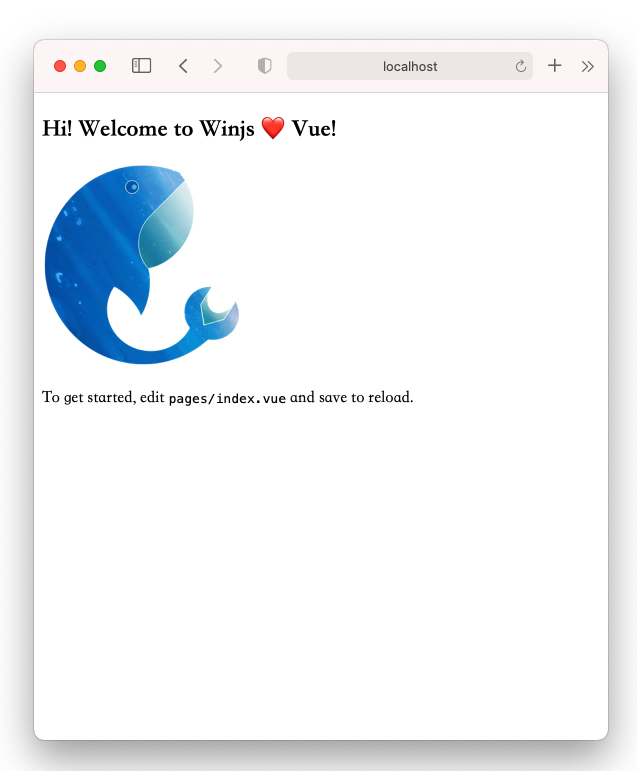
Open http://localhost:8000/ in your browser to see the following interface:
Enable Prettier (Optional)
If you need to use prettier for automatic code formatting in your project, execute pnpm win g:
$ pnpm win g
✔ Pick generator type › Enable Prettier -- Enable Prettier
info  - Write package.json
info  - Write .prettierrc
info  - Write .prettierignore
info  - Install dependencies with pnpm
Build and Deploy
Execute the pnpm build command:
> win build
event - compiled successfully in 1179 ms (567 modules)
event - build index.html
Build artifacts will be generated in the ./dist directory by default:
./dist
├── index.html
├── win.css
└── win.js
After completing the build, you can deploy the dist directory to the server.
Browser Support
Local development: Recommended to use the latest version of Chrome browser.
Production environment: Web and H5 support modern browsers, where Vue3 does not support IE. See What browsers does Vue support
Note
Using Vue 3.x requires considering more compatibility issues
- Vue3.x does not support IE11
- Vue3.x is not compatible with Chrome versions in Android 6 and below webviews
Details are as follows:
Vue3
- Web

IE
Edge
Firefox
Chrome
Safarinot support last 2 versions last 2 versions last 2 versions、>=51 last 2 versions - Mobile H5
Android iOS >= 6.0 >= 10.0 Vue2
Web
IE
Edge
Firefox
Chrome
Safari>= 11 last 2 versions last 2 versions、>= 34 last 2 versions、>=51 last 2 versions Mobile H5
Android iOS >= 6.0 >= 10.0